
Hosting & Infrastructure Reviews • 2026
Affiliate Disclosure: This site contains affiliate links for which Expert Product Lab may be compensated if you make a purchase. Our technical evaluations are based on real-world usability, scalability, and enterprise ROI potential.
Best WordPress Hosting 2026: Kinsta vs WP Engine vs Cloudways — The CTO-Grade Audit
Choosing the wrong WordPress host doesn’t just hurt your load times — it shapes your entire operational model. Teams that start on the wrong platform spend 6–18 months migrating at exactly the moment they need to be building. At Expert Product Lab, we audited the three managed WordPress hosts that dominate serious evaluations in 2026 — Kinsta, WP Engine, and Cloudways — through a CTO lens: infrastructure, pricing architecture, hidden costs, support depth, developer experience, and the exact decision criteria that separate them. This is not a generic review. It is a decision framework.
If you’re also evaluating your full SaaS stack, see our Best CRM for Small Business 2026 audit and HubSpot Free vs Paid 2026 for the complementary tools that complete a modern business infrastructure.
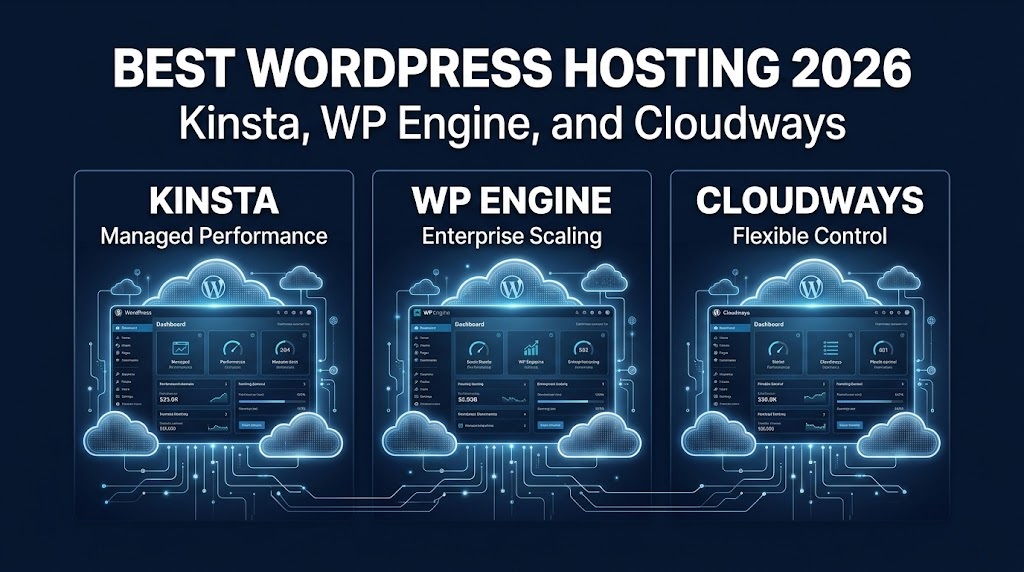
Best WordPress Hosting 2026: Kinsta, WP Engine, and Cloudways — infrastructure, pricing, and the decision framework for business, agency, and developer use cases.
SOURCE: EXPERT PRODUCT LAB ANALYSIS — INFRASTRUCTURE INTELLIGENCE DIVISION
Table of Contents:
1. 30-Second Verdict by Use Case
These three platforms are not interchangeable. Each serves a distinct operational profile. Read the detailed analysis below for the full picture — but if you need a quick decision anchor, start here.
| Your Situation | Best Fit | Why |
|---|---|---|
| Non-technical owner, revenue-generating site | Kinsta | Simplest dashboard, fully managed, minimal decisions required |
| Agency needing client portal and billing tools | WP Engine | White-label portal and client billing not available elsewhere |
| Agency managing 10+ sites on tight margins | Cloudways | Unlimited sites per server at $4–8 each; best multi-site economics |
| Organization requiring phone support | WP Engine | Only option with phone support included on all plans |
| Technically comfortable operator optimizing cost | Cloudways | Cloud performance at 30–60% less than Kinsta or WP Engine |
| WooCommerce store, no dev team | Kinsta or WP Engine | Managed updates, dedicated WordPress support, WP Engine adds phone |
| WooCommerce store, in-house developers | Cloudways | Object Cache Pro free on 4GB+ servers; strong value with technical capacity |
| Solo builder, single site, cost-sensitive | Cloudways | DigitalOcean entry at $14/mo delivers managed WordPress at a fraction of premium prices |
| Personal blog or hobby site | None of these | Shared hosting at $5–10/month is sufficient — managed hosting is unnecessary overhead |
2. Infrastructure & Performance
All three providers deliver strong WordPress performance for typical workloads. The differences emerge in consistency, configuration burden, and the performance ceiling — not in the average case.
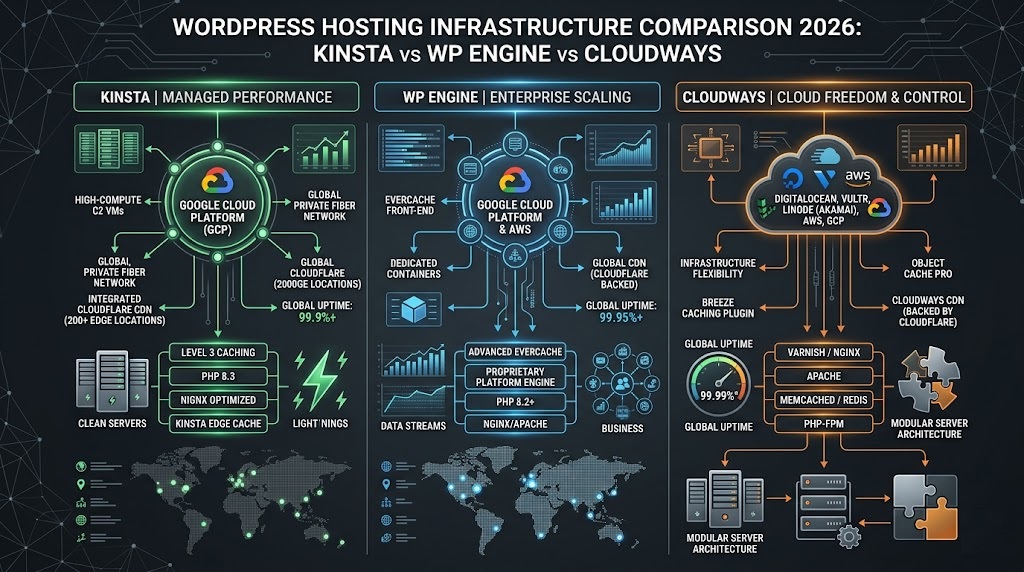
Infrastructure Comparison 2026: Google Cloud vs multi-cloud vs VPS — how Kinsta, WP Engine, and Cloudways differ at the infrastructure layer.
SOURCE: EXPERT PRODUCT LAB ANALYSIS — INFRASTRUCTURE INTELLIGENCE DIVISION
Kinsta runs exclusively on Google Cloud’s premium tier network with Cloudflare Enterprise CDN included on every plan. The combination produces consistently low TTFB and strong geographic distribution across 27 global data centers. Performance is highly predictable because Kinsta controls the entire stack — no configuration decisions required from the operator. Well-optimized sites on Kinsta achieve fast load times without manual tuning.
Key infrastructure specs: isolated container architecture (no shared resources between sites), Cloudflare Enterprise WAF + DDoS protection included, daily backups with 14–30 day retention, APM tool built-in at no extra cost, and uptime monitoring every 3 minutes (480 checks/day).
WP Engine — Google Cloud / AWS + EverCache
WP Engine runs on Google Cloud or AWS (select plans) with its proprietary EverCache caching layer and Cloudflare Enterprise CDN. Performance is comparable to Kinsta for most workloads. Automatic scaling handles traffic spikes within plan limits. The infrastructure is controlled and predictable — similar to Kinsta’s model. WP Engine’s notable infrastructure advantage is Atlas, a headless WordPress product that delivers exceptional performance for teams running a Next.js or Astro frontend backed by WordPress as a CMS.
Cloudways — Multi-Cloud (Your Choice)
Cloudways adds a managed layer over your chosen cloud provider: DigitalOcean, Vultr, Linode, AWS, or Google Cloud. The performance ceiling is the same as Kinsta and WP Engine — but the floor is lower. A properly configured Vultr High Frequency or DigitalOcean Premium server with Cloudflare Enterprise CDN delivers performance directly competitive with Kinsta. A basic DigitalOcean server without CDN will underperform meaningfully. The performance question on Cloudways is a configuration question: you are responsible for getting the setup right. The upside is that you can achieve premium performance at commodity prices when you have the technical capacity to configure correctly.
3. Real Pricing — What You Actually Pay
Headline pricing tells a misleading story. The real comparison requires accounting for add-ons, overage charges, and features that some providers bundle and others charge separately. The cost gap between Cloudways and premium providers is smaller than it appears at a single site — and much larger at agency scale.
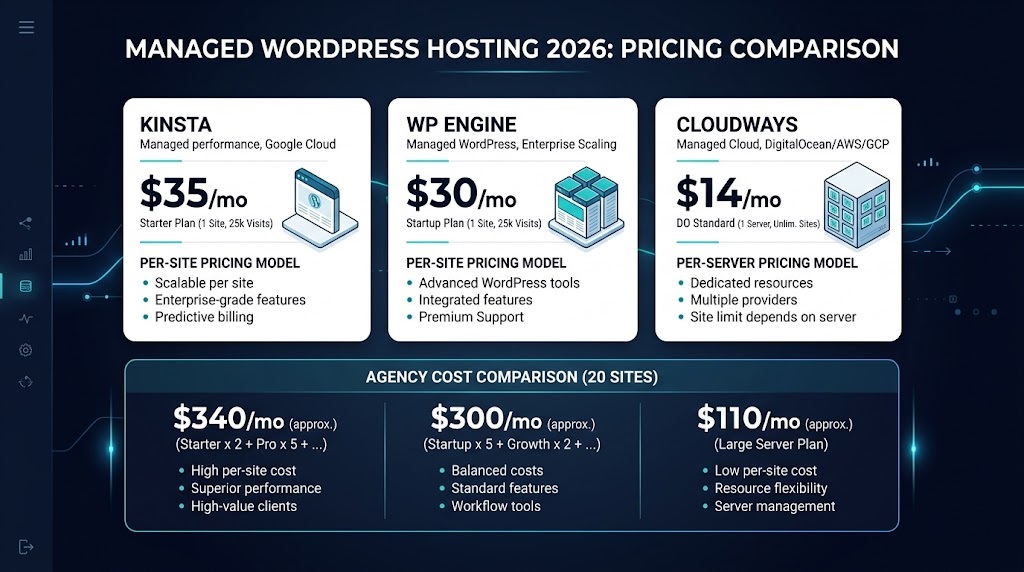
Hosting Pricing 2026: True monthly cost at 1, 5, and 15 sites — including CDN, backups, and add-ons factored in.
SOURCE: EXPERT PRODUCT LAB ANALYSIS — INFRASTRUCTURE INTELLIGENCE DIVISION
Single Site (30,000–50,000 monthly visits)
| Cost Item | Kinsta | WP Engine | Cloudways |
|---|---|---|---|
| Base plan | $35–50/mo | $30–50/mo | $14/mo (DO 1GB) – $24/mo (DO 2GB) |
| CDN | ✅ Included | ✅ Included | +$4.99/site/mo (Cloudflare Enterprise) |
| Daily backups | ✅ Included | ✅ Included | +$3–8/mo (varies by storage) |
| Auto WordPress updates | ✅ Included | ✅ Included | Manual (free) or paid add-on |
| Estimated total | $35–50/mo | $30–50/mo | $22–37/mo |
At a single site, the real cost difference is only $5–15/month after add-ons. For most operators, the decision is not about price at this tier — it’s about what Kinsta and WP Engine provide for that small premium: full management, guaranteed performance, and deeper support.
Agency Portfolio (15 sites, mixed traffic)
| Cost Item | Kinsta | WP Engine | Cloudways |
|---|---|---|---|
| Base plan | $275–400/mo | $200–400/mo | $88–150/mo (2–3 servers) |
| CDN (15 sites) | ✅ Included | ✅ Included | +$75/mo |
| Backups | ✅ Included | ✅ Included | +$15–30/mo |
| Estimated total | $275–400/mo | $200–400/mo | $178–255/mo |
| Per-site cost | $18–27 | $13–27 | $12–17 |
At 15 sites, Cloudways saves $100–200/month compared to Kinsta, and $50–150 compared to WP Engine. Annually, that’s $600–2,400 in savings — enough to hire a part-time developer or invest in tooling. The gap widens further at 25+ sites because Cloudways charges per server, not per site.
4 Support Comparison
Support is the area where all three providers differ most clearly — and where the decision has the most real-world impact for operators without deep technical capacity.
| Support Feature | Kinsta | WP Engine | Cloudways |
|---|---|---|---|
| Availability | 24/7/365 | 24/7/365 | 24/7/365 |
| Phone support | ❌ No | ✅ All plans | ❌ No ($100+/mo add-on) |
| Live chat | ✅ Avg. under 2 min | ✅ Fast response | ✅ Mixed reviews |
| WordPress expertise depth | ⭐⭐⭐⭐⭐ Deep | ⭐⭐⭐⭐⭐ Deep | ⭐⭐⭐ Server-focused |
| Dedicated account manager | Higher tiers | Higher tiers | ❌ Not available |
| Malware fix included | ✅ Free | ✅ Free | ❌ Paid add-on |
WP Engine is the only option with phone support on all plans — a genuine differentiator for organizations where calling support is a requirement (enterprise procurement, healthcare, finance). Kinsta’s chat support resolves WordPress-specific issues faster than most competitors — the team controls the full stack, which means they can diagnose across the entire environment. Cloudways support covers a broader configuration surface (5 cloud providers) which produces thinner WordPress-specific depth on average. For operators who rarely contact support, this distinction is invisible. For operators who depend on support as a backup, it matters.
5. Developer Experience
All three provide SSH, SFTP, Git integration, WP-CLI, staging environments, and multiple PHP versions. The differences are in workflow depth and configuration flexibility.
- Kinsta: Clean MyKinsta dashboard, staging-to-production workflow, site analytics, APM, environment variables, DevKinsta local dev tool. Strong for developers who want a polished managed experience without server-level complexity.
- WP Engine: Deepest developer tooling — Local (local-first dev environment with push/pull to production), multi-staging environments on higher plans, Atlas for headless WordPress deployments, Git pipeline. Best for agencies and developers who use Local as their standard workflow.
- Cloudways: Most infrastructure-level flexibility — configure PHP workers, adjust caching parameters, run non-WordPress PHP apps (Laravel, Drupal, Magento) on the same server. No disallowed plugin list. Best for developers who need VPS-level control with a managed convenience layer on top.
6. Agency & Multi-Site Use
Agency hosting requirements differ fundamentally from single-site requirements. The key factors: client-facing portals, billing infrastructure, bulk management, and per-site economics at scale.
- WP Engine has the strongest agency tooling: white-label client portal, client billing (invoice clients directly through WP Engine), bulk site management, transferable installs. If clients interact with hosting directly and expect a branded experience, WP Engine is the only real option among these three.
- Kinsta provides centralized multi-site management through MyKinsta with user roles and company-level access — functional, but not agency-specific. No white-label, no client billing. Best for agencies that manage hosting behind the scenes without client-facing portal requirements.
- Cloudways has basic team collaboration features but no agency-specific tooling. Its agency value is entirely economic: unlimited sites per server means per-site costs of $4–8 instead of $15–30. Agencies running 15–30 sites save $1,000–3,000 annually versus Kinsta or WP Engine — with the tradeoff of more operational self-management.
7. WooCommerce Hosting
All three platforms support WooCommerce, but the support model and included features differ in ways that matter for ecommerce operators.
| WooCommerce Feature | Kinsta | WP Engine | Cloudways |
|---|---|---|---|
| Managed WooCommerce updates | ✅ | ✅ | ❌ Manual |
| Object caching (Redis) | Add-on | Included | Object Cache Pro (free on 4GB+) |
| Cart/checkout cache exclusions | ✅ Server-level | ✅ Server-level | ✅ Plugin-level |
| Support for checkout emergencies | Chat (fast) | Phone + chat | Chat (server-focused) |
| Best for | No dev team, mid-traffic | No dev team, phone required | In-house devs, high-traffic |
Cloudways’ standout advantage: Object Cache Pro — a $95/month value — is included free on 4GB+ servers. This directly accelerates WooCommerce database performance in a way that neither Kinsta nor WP Engine matches at standard pricing. For stores with in-house developers, this is a significant value unlock.
8. Full Feature Comparison Table
| Feature | Kinsta | WP Engine | Cloudways |
|---|---|---|---|
| Entry price | ~$35/mo | ~$30/mo | ~$14/mo |
| Pricing model | Per site + visits/bandwidth | Per site + visits | Per server (unlimited sites) |
| Infrastructure | Google Cloud | Google Cloud / AWS | DO, Vultr, Linode, AWS, GCP |
| Data centers | 27 globally | Multiple regions | Depends on chosen provider |
| CDN | Cloudflare Enterprise (included) | Cloudflare Enterprise (included) | Cloudflare Enterprise (+$4.99/site) |
| Phone support | ❌ | ✅ All plans | ❌ (+$100+/mo add-on) |
| Chat support | ✅ Under 2 min avg. | ✅ Fast | ✅ Mixed reviews |
| Auto WP updates | ✅ Included | ✅ Included | Manual or paid add-on |
| Daily backups | ✅ Included | ✅ Included | Paid (+$0.33/GB) |
| Staging environment | 1 per site | Included (more on higher plans) | Included |
| Object caching | Redis (add-on) | Included | Object Cache Pro (free on 4GB+) |
| White-label portal | ❌ | ✅ | ❌ |
| Client billing | ❌ | ✅ | ❌ |
| Non-WP app hosting | ❌ | ❌ | ✅ PHP apps |
| Headless WordPress | Supported | ✅ Atlas product | Not optimized |
| Local dev tool | DevKinsta | Local (with push/pull) | ❌ |
| Plugin restrictions | Yes (disallowed list) | Yes (disallowed list) | Minimal |
| APM tool | ✅ Free on all plans | Available | New Relic integration (paid) |
| Malware fix | ✅ Free | ✅ Free | Paid add-on |
| Money-back / trial | 30-day guarantee | 60-day money-back | 3-day free trial, pay-as-you-go |
| Email hosting | ❌ | ❌ | ❌ |
9. CTO Verdict
10. Frequently Asked Questions
For a single site, the real price difference after Cloudways add-ons (CDN, backups) is only $5–15/month. At that margin, the question is whether Kinsta’s fully managed experience — automatic updates, built-in APM, malware fix included, no configuration decisions — is worth $180/year. For non-technical owners and revenue-generating sites, it typically is. For technically confident operators, Cloudways delivers comparable performance at the lower price.
WP Engine for phone support — it’s the only option among these three with 24/7 phone access on all plans. Kinsta for chat-based WordPress expertise — their support team controls the full stack and resolves WordPress-specific issues fastest. Cloudways covers server-level issues well but has less WordPress depth than Kinsta or WP Engine. For organizations where calling support is a requirement, WP Engine is the only answer.
At 15 sites, Cloudways saves $100–200/month versus Kinsta and $50–150 versus WP Engine — $600–2,400 annually. The savings compound because Cloudways charges per server (unlimited sites), while Kinsta and WP Engine charge per site. At 25+ sites, the gap grows further. The tradeoff: Cloudways requires more operational self-management, especially for backups, CDN configuration, and WordPress update management.
Yes — WP Engine provides server-level cache exclusions for WooCommerce cart and checkout, automatic updates, and phone support for checkout emergencies. For stores without an in-house technical team, WP Engine’s fully managed environment and phone access make it the safest choice. For stores with developers, Cloudways’ Object Cache Pro inclusion (free on 4GB+ servers, a $95/month value) may deliver better ROI.
The most common surprises: (1) Cloudways backups and CDN are not included in the base price — add $8–20/month for a complete setup. (2) Kinsta and WP Engine charge per-site visit/bandwidth overages when traffic spikes exceed plan limits. (3) WP Engine’s malware scanning and security are included; Cloudways charges separately. (4) Cloudways premium support is a $100+/month add-on — not included. Always calculate total cost including CDN, backups, security, and support tier before comparing headline prices.
Yes — Cloudways charges per server, not per site. A single $24/month DigitalOcean 2GB server can host multiple low-to-medium traffic WordPress sites, bringing the effective per-site cost to $4–8. This is Cloudways’ strongest advantage for agencies and developers managing multiple sites. Kinsta and WP Engine both charge per site, which makes Cloudways’ economics significantly more attractive at 5+ sites.

Pingback: ROI Guide for CTOs: Maximizing 2026 Software Infrastructure
Pingback: The 2026 Founder Stack: Hosting, Home Office, and AI Workflows
Pingback: Enterprise AI Budgeting 2026: 4 Traps That Destroy ROI (And How to Avoid Them)