CRM & SaaS Reviews • 2026
Affiliate Disclosure: This site contains affiliate links for which Expert Product Lab may be compensated if you make a purchase. Our technical evaluations are based on real-world usability, scalability, and enterprise ROI potential.
HubSpot Free vs Paid 2026: When the Upgrade Actually Pays Off
HubSpot markets itself as a free CRM forever — and technically, that’s true. But after auditing dozens of SaaS stacks at Expert Product Lab, we’ve seen the same pattern repeat: teams build their entire sales and marketing workflow inside HubSpot Free, hit a wall 12–18 months in, and face a painful choice between a costly upgrade or an even costlier migration. This guide gives you the honest breakdown of HubSpot Free vs Paid in 2026 — what you actually get, where the real limits are, what the hidden costs look like, and exactly when the upgrade pays for itself.
If you’re still deciding which CRM to start with, read our full Best CRM for Small Business 2026 audit first — then come back here to understand the HubSpot upgrade decision in depth. For infrastructure decisions that affect your full SaaS stack, see our 2026 B2B SaaS Ecosystem & ROI Guide.
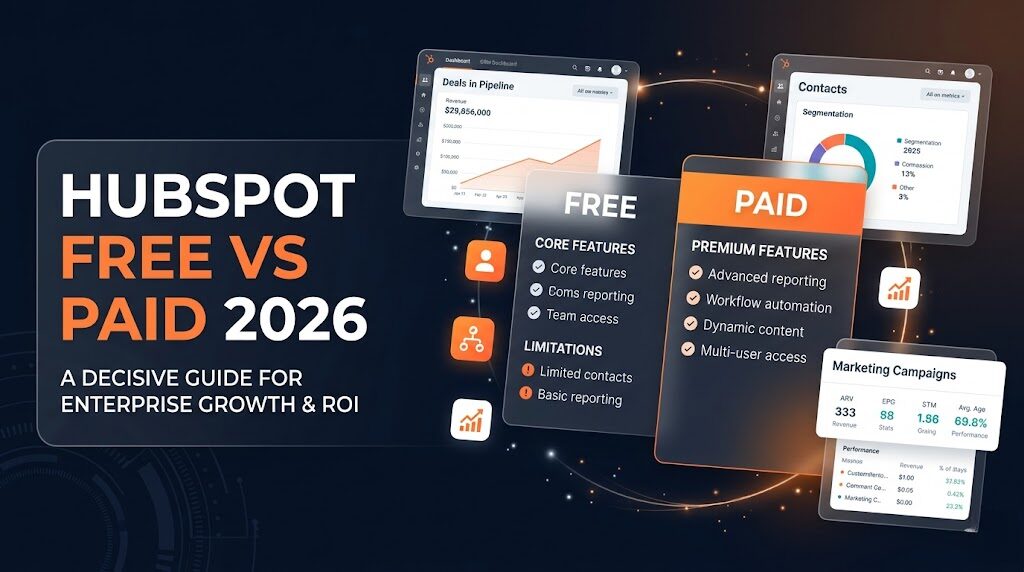
HubSpot Free vs Paid 2026: Feature limits, pricing tiers, and the exact upgrade triggers for small business teams.
SOURCE: EXPERT PRODUCT LAB ANALYSIS — SAAS INTELLIGENCE DIVISION
Table of Contents:
1. What HubSpot Free Actually Includes in 2026
HubSpot Free is genuinely one of the most powerful free CRM plans available in 2026. For solo founders, freelancers, and teams of 1–3 people with a simple sales process, it covers the fundamentals without asking for a credit card. The free plan includes unlimited contact storage, a single deal pipeline, email tracking, meeting scheduling, live chat, and basic chatbots — a feature set that would cost $200+/month at a competitor.
The key to understanding HubSpot Free is recognizing what it is: a fully functional entry-level CRM, not a crippled demo. HubSpot’s business model relies on teams growing into paid plans naturally — which means they make the free tier genuinely useful. The trap isn’t that the free plan is bad. The trap is that it’s good enough to build a workflow around, which makes hitting the limits painful later.
| Feature | HubSpot Free 2026 | Notes |
|---|---|---|
| Contact storage | ✅ Unlimited | No cap on contacts |
| Users | ✅ Unlimited | Most are view-only |
| Deal pipelines | ⚠️ 1 only | Major constraint for multi-product teams |
| Marketing emails/mo | ⚠️ 2,000 | Hard cap — emails stop when reached |
| Custom properties | ⚠️ Up to 10 | Starter removes this limit |
| Automation workflows | ❌ None | Biggest gap vs paid |
| Lead scoring | ❌ None | Professional only |
| Custom reports | ❌ Very limited | Basic dashboards only |
| HubSpot branding | ❌ Can’t remove | On all forms, emails, chat |
| A/B testing | ❌ None | Professional only |
| API access | ⚠️ Restricted | Rate-limited and partial |
| Meeting scheduler | ✅ Included | 1 link per user |
| Live chat & chatbot | ✅ Basic | HubSpot branding visible |
| Email tracking | ✅ Included | Open and click tracking |
| Shared inbox | ✅ Included | 1 inbox |
| Quotes | ✅ Included | Basic quote generation |
2. The Real Limits of HubSpot Free
The free plan is best understood as a functional starting point, not a permanent solution for growing teams. The median HubSpot Free user upgrades after 14 months — which means most teams eventually hit these walls. Knowing them in advance lets you plan the upgrade before the limitations start costing you revenue.
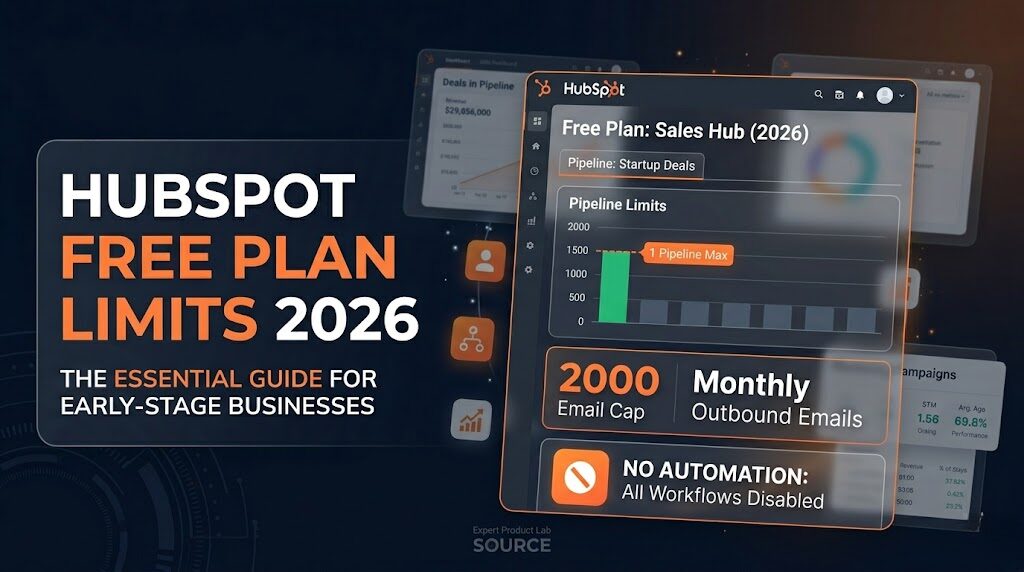
HubSpot Free Plan Limits 2026: The key constraints that drive small business teams to upgrade — pipelines, email caps, and automation gaps.
SOURCE: EXPERT PRODUCT LAB ANALYSIS — SAAS INTELLIGENCE DIVISION
🚧 Limit #1 — No Automation Workflows
This is the biggest gap between HubSpot Free and any paid plan. HubSpot Free has zero multi-step workflow automation. No behavior-based triggers, no automated lead nurturing sequences, no lifecycle stage automation, no internal task assignment based on deal stage. Every follow-up stays manual — which is sustainable at 20 leads/month, and completely unsustainable at 200. The moment your team spends more than 3 hours/week on manual follow-up tasks, automation pays for itself.
🚧 Limit #2 — 2,000 Marketing Emails/Month Hard Cap
The free plan caps marketing email sends at 2,000/month for the entire account. This sounds generous until you do the math: a list of 500 contacts that you email weekly hits this ceiling in exactly 4 sends. When the cap is reached, HubSpot stops sending — with no warning to the recipient. For businesses running monthly newsletters, promotional campaigns, or onboarding sequences, this is a revenue-impacting constraint.
🚧 Limit #3 — Only 1 Deal Pipeline
Teams with more than one product line, service tier, or sales channel immediately feel this constraint. One pipeline forces everyone into the same funnel — which distorts reporting, makes it impossible to manage different sales processes separately, and creates confusion for reps handling different deal types. This single limit is often the first reason teams upgrade, even before hitting the email cap.
🚧 Limit #4 — HubSpot Branding on All Client-Facing Assets
Every form, email, chatbot, landing page, and quote carries “Powered by HubSpot” branding on the free plan. For B2B companies presenting to enterprise clients, agencies delivering white-label work, or any business that needs to maintain a professional brand identity in client interactions — this is a credibility problem that Starter fixes for $20/month.
🚧 Limit #5 — View-Only Users by Default
Unlimited users sounds generous — but most seats are view-only by default. Full edit, write, and admin access requires paid Core Seats ($20/seat/month on Starter). As the team grows and more people need to create deals, update contacts, and send tracked emails, seat-based pricing becomes a significant cost driver that teams rarely anticipate when starting on the free plan.
🚧 Limit #6 — No A/B Testing or Advanced Reporting
Free reporting tells you what happened — basic contact and deal counts. It does not tell you why. No A/B testing for emails or landing pages, no funnel analysis, no attribution reporting, no custom dashboards beyond basic presets. Teams making data-driven decisions need Professional or above for meaningful analytics.
HubSpot’s pricing page lists the plan costs — but the total cost of ownership often surprises teams that don’t plan ahead. These are the hidden costs that appear as you scale on any HubSpot plan, including paid tiers.
- Core Seats vs. View-Only Seats: Every user who needs to write, edit, or manage data pays per seat. A 5-person sales team on Starter costs $100/month minimum — not $20.
- Onboarding Fees: HubSpot charges mandatory onboarding fees for Professional ($3,000 one-time) and Enterprise ($6,000 one-time). This is non-negotiable for new customers upgrading to these tiers.
- Contact Tier Limits: Marketing Hub plans price by the number of marketing contacts. Exceeding your contact tier triggers automatic billing at the next tier. A list of 5,001 contacts on a 5,000-contact plan results in an automatic upgrade charge.
- Add-On Hubs: CRM, Marketing, Sales, Service, and Content are separate Hubs. The free CRM includes basic functionality from each. Unlocking the full feature set of any specific Hub requires purchasing that Hub’s paid plan separately — or bundling via the Starter Customer Platform.
- API Call Limits: Custom integrations on the free plan are rate-limited at 100 API calls/10 seconds. Heavy integration use (syncing with Shopify, billing systems, or custom apps) often requires a paid plan just for the API quota increase.
4. HubSpot Paid Plans Breakdown 2026
HubSpot’s paid structure in 2026 is organized around Hubs (CRM, Marketing, Sales, Service, Content) available individually or bundled. For most small businesses, the Starter Customer Platform at $20/seat/month is the entry point that eliminates the most painful free plan limitations at the lowest cost. The Professional tier is a growth-stage investment — meaningful for teams of 10–50 people with high-volume pipelines.
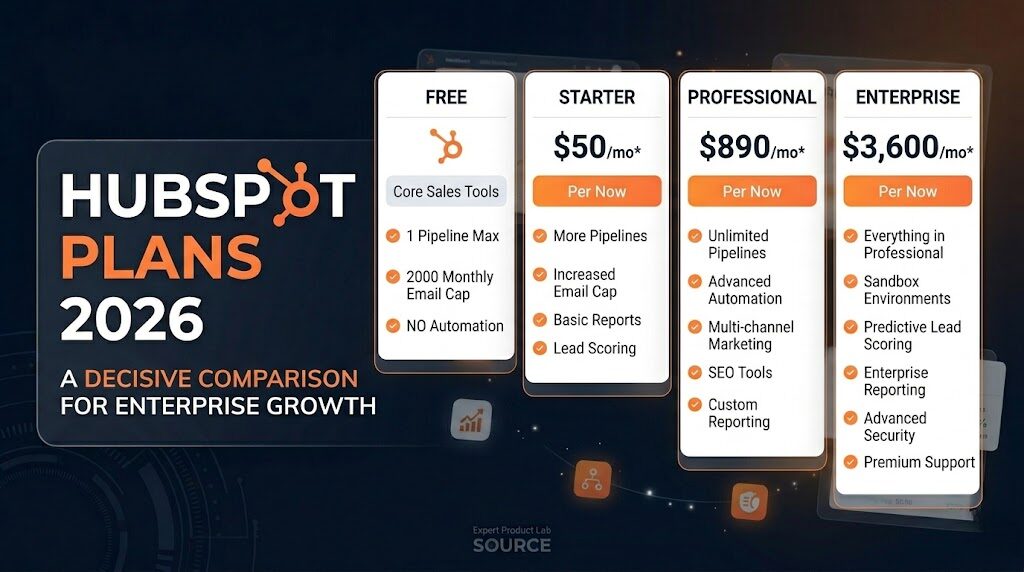
HubSpot Pricing Tiers 2026: Starter, Professional, and Enterprise — costs, feature unlocks, and ROI by team size.
SOURCE: EXPERT PRODUCT LAB ANALYSIS — SAAS INTELLIGENCE DIVISION
| Plan | Monthly Price | Annual Price | Best For | Key Unlock |
|---|---|---|---|---|
| Free | $0 | $0 | Solo founders, 1–3 person teams | Basic CRM + email tracking |
| Starter | $20/seat/mo | $15/seat/mo | Small teams scaling up | Branding removed, 5K emails, 10 pipelines |
| Professional | $890/mo (3 seats) | $800/mo (3 seats) | Growth-stage teams (10–50 people) | Full automation, lead scoring, A/B testing |
| Enterprise | $3,600/mo (5 seats) | $3,600/mo (5 seats) | Scaling enterprises | Custom objects, revenue attribution, sandboxes |
5. Free vs Paid — Full Feature Comparison
| Feature | Free | Starter | Professional | Enterprise |
|---|---|---|---|---|
| Contact management | ✅ Unlimited | ✅ Unlimited | ✅ Unlimited | ✅ Unlimited |
| Deal pipelines | 1 | 10 | Unlimited | Unlimited |
| Marketing emails/mo | 2,000 | 5,000 | 50,000+ | Custom |
| Automation workflows | ❌ | Basic sequences | ✅ Full multi-step | ✅ Advanced |
| Lead scoring | ❌ | ❌ | ✅ | ✅ Predictive |
| A/B testing | ❌ | ❌ | ✅ | ✅ |
| Custom reports | ❌ | Basic | ✅ Advanced | ✅ Full suite |
| HubSpot branding | ❌ Can’t remove | ✅ Removed | ✅ Removed | ✅ Removed |
| AI tools | Limited | Basic | ✅ Full AI suite | ✅ Full AI suite |
| Revenue attribution | ❌ | ❌ | ✅ | ✅ Multi-touch |
| Custom properties | 10 | Unlimited | Unlimited | Unlimited |
| Onboarding fee | None | None | $3,000 one-time | $6,000 one-time |
| Price | $0 | $20/seat/mo | $890/mo (3 seats) | $3,600/mo (5 seats) |
6. The 5 Upgrade Triggers
Based on our SaaS stack audits, these are the exact signals that indicate staying on HubSpot Free is costing more in team time and lost revenue than the upgrade price. If you recognize any of these in your current workflow, it’s time to move to Starter.
If your team sends follow-up emails manually after demos, trials, or form fills — and you have more than 20 new leads per week — automation on Starter pays for itself in saved hours within the first week. A 3-hour manual task that an automated sequence handles in 0 minutes has a clear dollar value: at even a $25/hour rate, that’s $300+/month saved on a $20/month upgrade.
When your monthly email sends hit the 2,000 cap before the month ends, you’re losing revenue directly — prospects stop receiving follow-ups mid-sequence, newsletters don’t reach the full list, and campaign performance data becomes unreliable. Starter raises the limit to 5,000; Professional removes it effectively.
If you sell more than one product, manage multiple reps with different deal flows, or run separate B2B and B2C processes — one pipeline creates blind spots in reporting and forces incompatible deal stages into a single view. This is the most commonly cited reason small businesses upgrade from Free to Starter.
If you’re sending proposals, forms, or chat widgets with “Powered by HubSpot” to enterprise clients, agency prospects, or any audience where brand professionalism is a decision factor — this is a credibility issue. Starter removes all branding for $20/month, which is the single cheapest brand upgrade available in any CRM.
Free reporting shows pipeline snapshots. It does not explain conversion rates, drop-off points, or which traffic sources close at the highest rate. If your team is making pricing, messaging, or targeting decisions without funnel analytics — Professional’s advanced reporting pays for itself in one strategic pivot per quarter.
7. Who Should Choose Each Plan
8. CTO Verdict
HubSpot Free is one of the best starting points in the CRM market in 2026 — but it is a starting point, not a destination for growing teams. The upgrade decision is not about whether to upgrade, but when. The answer is almost always: earlier than you think, because the manual work created by free plan limitations costs more than the Starter plan price within the first month of hitting the caps.
The Starter Customer Platform at $20/seat/month is the best value upgrade in HubSpot’s entire lineup. It removes branding, expands all key limits, and adds basic automation — eliminating the most painful friction points in a single move. Professional is a growth-stage investment with a clear ROI at 10+ person teams. Enterprise is for scaling businesses that need custom data architecture and enterprise-grade security.
For teams where the HubSpot upgrade price is genuinely prohibitive, Zoho CRM and Freshsales are legitimate alternatives at lower price points. The right CRM is the one your team actually uses — and stays within your budget long enough to compound the relationship data that makes any CRM valuable.
9. Frequently Asked Questions
Yes — HubSpot Free is genuinely free with no time limit and no credit card required. The free tier is a permanent product, not a trial. However, “free forever” applies to the basic CRM functionality only. The features most growing businesses need — workflow automation, advanced reporting, branding removal, lead scoring, and A/B testing — require paid upgrades starting at $20/seat/month.
Automation. HubSpot Free has zero workflow automation — every follow-up, lead assignment, and lifecycle stage update is manual. Starter introduces basic automated sequences that eliminate the most time-consuming manual CRM work. Secondary to automation: branding removal ($20/month eliminates “Powered by HubSpot” from all client-facing assets) and the expansion from 1 to 10 deal pipelines.
The most common surprises: (1) Core Seat pricing — most free users are view-only; full edit access requires paid seats, so a 5-person Starter team costs $100/month minimum, not $20. (2) Mandatory onboarding fees for Professional ($3,000) and Enterprise ($6,000). (3) Marketing contact tier limits — exceeding your purchased contact tier triggers an automatic billing upgrade. (4) Add-on Hub costs — each Hub (Marketing, Sales, Service) prices separately beyond the bundle.
The median team upgrades after 14 months on HubSpot Free. The clearest signal is when manual CRM work — follow-up emails, lead assignments, status updates — takes more than 3 hours per week per rep. That manual time cost almost always exceeds the $20/month Starter price within the first week. Other clear triggers: hitting the 2,000 email cap, needing a second pipeline, or presenting HubSpot-branded assets to enterprise clients.
For teams under 10 people, Professional is typically over-priced relative to actual feature usage. The right moment for Professional is when you need all three of: multi-step workflow automation beyond basic sequences, lead scoring to prioritize a pipeline with 100+ active deals, and A/B testing + revenue attribution for data-driven decisions. At a 10–50 person team with high-volume inbound, Professional pays for itself in one month of improved conversion rates. Note the mandatory $3,000 onboarding fee that applies on top of the monthly cost.
Zoho CRM Standard at $14/user/month is the closest feature-for-feature alternative to HubSpot Starter, with Zia AI for lead scoring included. Freshsales Growth at $9/user/month includes Freddy AI and built-in telephony — the best choice for teams with high call volume. Both offer full workflow automation at prices below HubSpot Starter. Full comparison in our Best CRM for Small Business 2026 audit.

Pingback: Best WordPress Hosting 2026: Kinsta vs WP Engine vs Cloudways
Pingback: Agentic AI CRM for Small Business: What Actually Matters in 2026