
Cloud & Hosting • 2026
Affiliate Disclosure: This site contains affiliate links for which Expert Product Lab may be compensated if you make a purchase. Our technical evaluations are based on infrastructure utility, scalability, and enterprise ROI potential.
Best Mini PCs for Home Lab 2026: The Enterprise Cloud Practice Audit
Finding the best mini PC home lab 2026 is no longer optional for cloud architects, DevOps engineers, and CTOs building hands-on infrastructure skills — it is a career infrastructure decision. In 2026, mini PCs have replaced the repurposed desktop tower as the go-to hardware for running Proxmox, Kubernetes, pfSense, and multi-node virtualization environments at home. The question is no longer whether to build a home lab, but which hardware delivers the best infrastructure-to-cost ratio.
At Expert Product Lab, we evaluate home lab hardware through a CTO lens: compute density, power efficiency, network throughput, and long-term scalability for enterprise-grade workloads. For hosting decisions that directly impact your infrastructure stack, see our Kinsta vs WP Engine 2026 Enterprise Hosting Audit.
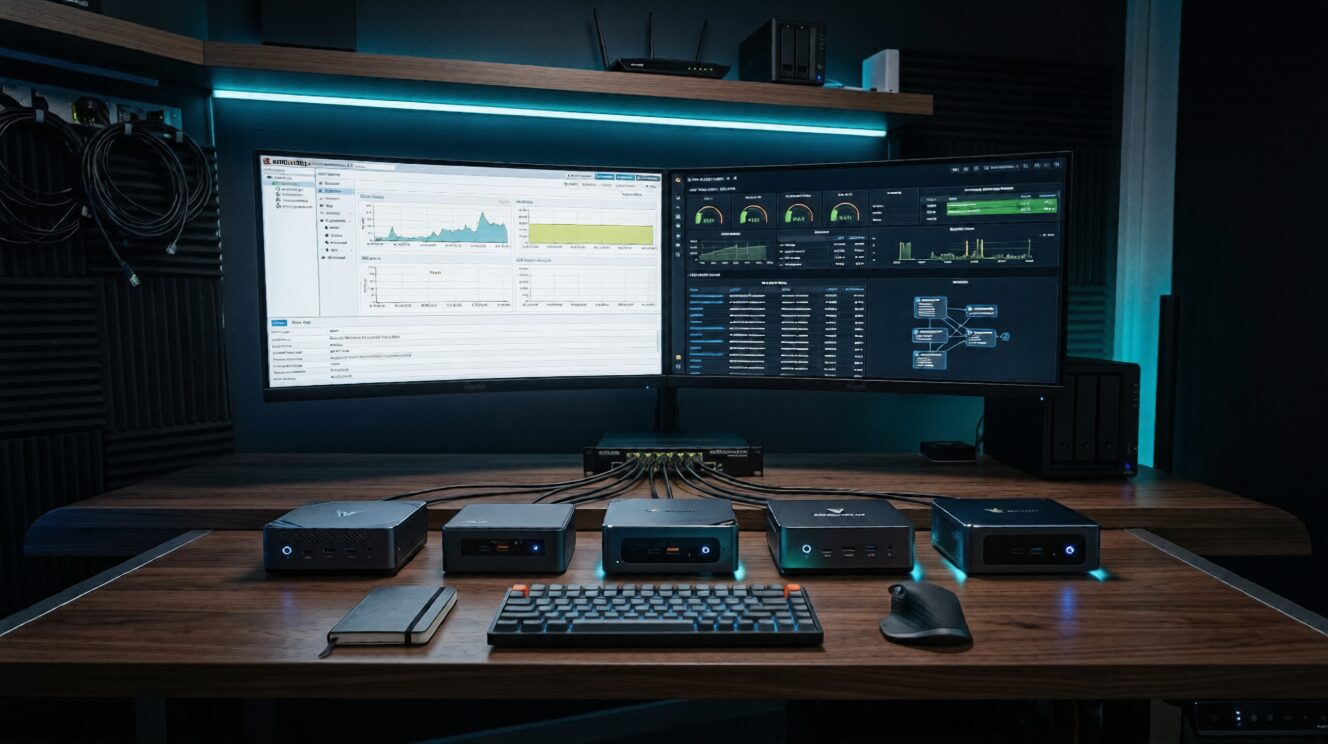
Enterprise Home Lab Audit: Best Mini PCs for Cloud Practice — Infrastructure, Performance and ROI Analysis for 2026.
SOURCE: EXPERT PRODUCT LAB ANALYSIS — CLOUD INFRASTRUCTURE DIVISION
Table of Contents:
1. Why Mini PCs Dominate Home Labs in 2026
The home lab landscape shifted decisively in 2026. Intel discontinued the NUC line, but the vacuum was rapidly filled by a new generation of mini PC manufacturers — Beelink, Minisforum, GMKtec, and ASUS — delivering enterprise-class compute in sub-$500 packages. The result: a mini PC today can run a full Proxmox cluster, host 10+ Docker containers, and simulate a hybrid cloud environment on under 15 watts of power consumption.
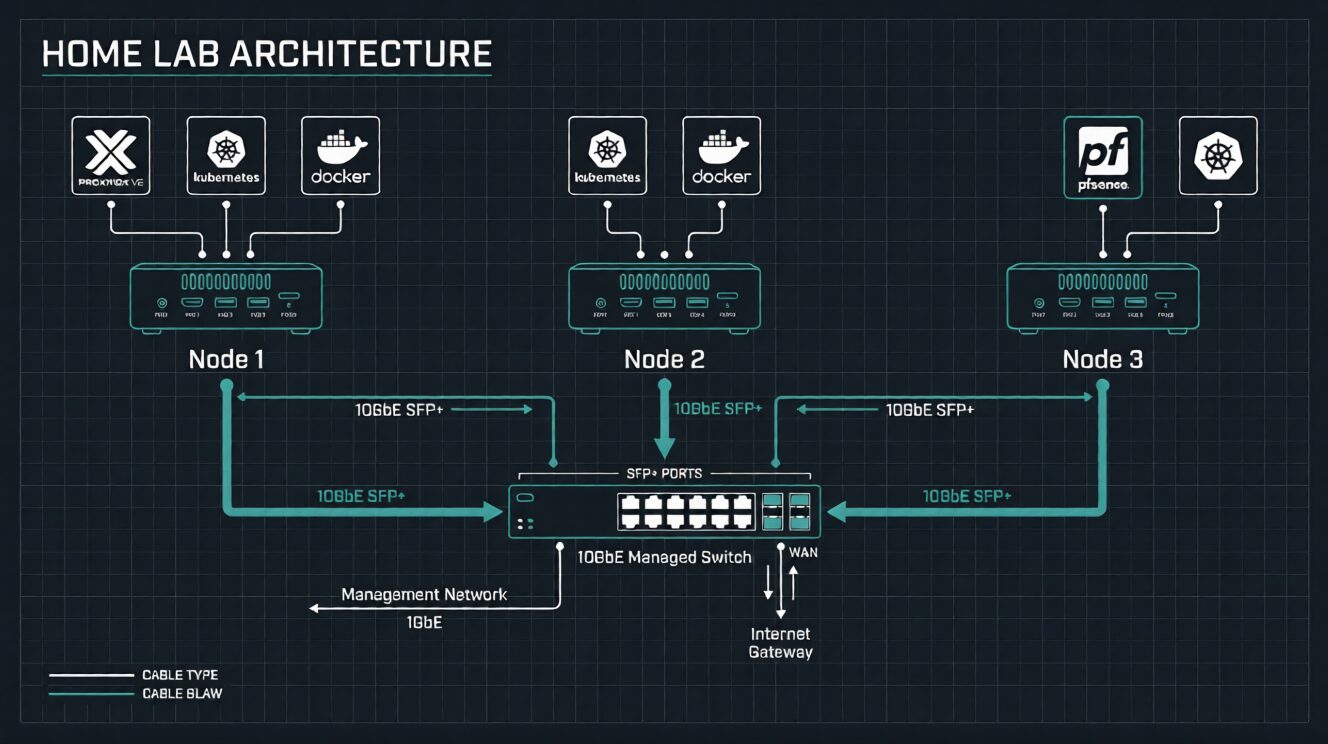
Home Lab Architecture: Multi-node mini PC setup running Proxmox VE, Kubernetes, and pfSense for enterprise cloud simulation.
SOURCE: EXPERT PRODUCT LAB ANALYSIS — CLOUD INFRASTRUCTURE DIVISION
- x86 Architecture: Unlike Raspberry Pi, every Docker image and enterprise tool runs natively — no ARM compatibility issues.
- Low Power Consumption: Modern N100/Ryzen mini PCs idle at 6–15W, making them cost-effective for 24/7 operation.
- Enterprise Workload Capable: Proxmox VE, VMware ESXi, Hyper-V, Kubernetes — all run flawlessly on 2026 mini PC hardware.
- Silent Operation: No noisy server fans — suitable for home office environments.
2. Top 5 Mini PCs for Home Lab 2026
🥇 #1 — Minisforum MS-01 (Best Overall)
The Minisforum MS-01 is the undisputed flagship of the 2026 home lab market. Powered by an Intel Core i5-12600H (12 cores, 16 threads), it is the only sub-$500 mini PC shipping with dual SFP+ 10GbE ports and dual 2.5GbE NICs — a network stack that rivals enterprise switches costing 10x more. For CTOs building multi-node Proxmox clusters or practicing Kubernetes networking, this is the definitive hardware choice. Pair this with a managed cloud hosting platform for a complete enterprise practice stack.
- CPU: Intel Core i5-12600H — 12C/16T, up to 4.5GHz
- RAM: Up to 64GB DDR5
- Network: 2× SFP+ 10GbE + 2× 2.5GbE
- Storage: 2× M.2 NVMe slots
- Idle Power: ~18–22W
- Price Range: ~$420–$480 (barebone)
🥈 #2 — ASUS NUC 14 Pro (Best for Low Power)
The ASUS NUC 14 Pro is Intel’s spiritual successor to the discontinued NUC line, now under ASUS stewardship. Running an Intel Core 3 100U (6C/8T), it achieves under 10W idle power — the lowest in its class — while supporting up to 48GB DDR5-5600. For engineers running always-on services like Pi-hole, Vaultwarden, or lightweight Kubernetes nodes, the NUC 14 Pro delivers the best performance-per-watt ratio in 2026.
- CPU: Intel Core 3 100U — 6C/8T
- RAM: Up to 48GB DDR5-5600
- Network: 1× 2.5GbE (Intel)
- Storage: 2× M.2 slots
- Idle Power: <10W typical
- Price Range: ~$350–$450 (barebone)
🥉 #3 — Beelink EQ12 Pro (Best Budget Entry)
The Beelink EQ12 Pro is the definitive entry-level home lab machine in 2026. Powered by the Intel N100 processor and drawing only 6 watts at idle, it ships pre-configured with 16GB RAM and a 500GB SSD — ready to run Proxmox, Docker, or Home Assistant out of the box. For engineers taking their first steps into virtualization, the EQ12 Pro offers an unmatched combination of price, simplicity, and reliability.
- CPU: Intel N100 — 4C/4T, 3.4GHz burst
- RAM: 16GB DDR5 (upgradeable)
- Network: 1× 2.5GbE
- Storage: 500GB SSD + M.2 expansion
- Idle Power: ~6W
- Price Range: ~$150–$200 configured
#4 — Geekom A8 (Best AMD Option)
The Geekom A8 brings AMD’s Ryzen 9 8945HS (8C/16T) to the mini PC home lab market, delivering exceptional multi-threaded performance for Plex transcoding, AI inference workloads, and heavy containerization. With support for up to 64GB DDR5 and a 2.5GbE NIC, the A8 is the go-to choice for engineers running GPU-adjacent workloads or building machine learning practice environments alongside cloud simulations.
- CPU: AMD Ryzen 9 8945HS — 8C/16T, up to 5.2GHz
- RAM: Up to 64GB DDR5-5600
- Network: 1× 2.5GbE (Realtek)
- Storage: 2× M.2 NVMe slots
- Idle Power: ~10–14W
- Price Range: ~$650–$850 configured
#5 — Dell OptiPlex Micro (Best Refurbished Value)
For teams on a tight budget, a refurbished Dell OptiPlex 7060/7070 Micro remains one of the shrewdest home lab investments in 2026. Available on Amazon for under $200 with an Intel Core i5-8500T or i7-8700T, these enterprise-grade machines offer proven reliability, dual display support, and easy RAM/SSD upgrades. The OptiPlex ecosystem’s maturity means abundant community support for Proxmox and ESXi deployments.
- CPU: Intel Core i5/i7 8th Gen (T-series)
- RAM: Up to 64GB DDR4
- Network: 1× 1GbE (Intel)
- Storage: M.2 NVMe + 2.5″ SATA
- Idle Power: ~8–12W
- Price Range: ~$120–$200 (refurbished)
3. Performance & Power Benchmarks
Power efficiency is a critical selection criterion for 24/7 home lab operation. At $0.12/kWh (US average), a 15W idle device costs approximately $15.77/year to run continuously — a negligible operational cost that makes mini PCs dramatically more cost-effective than repurposed desktop towers drawing 65–120W idle. For enterprise teams evaluating cloud hosting total cost of ownership, hardware efficiency at every layer matters.
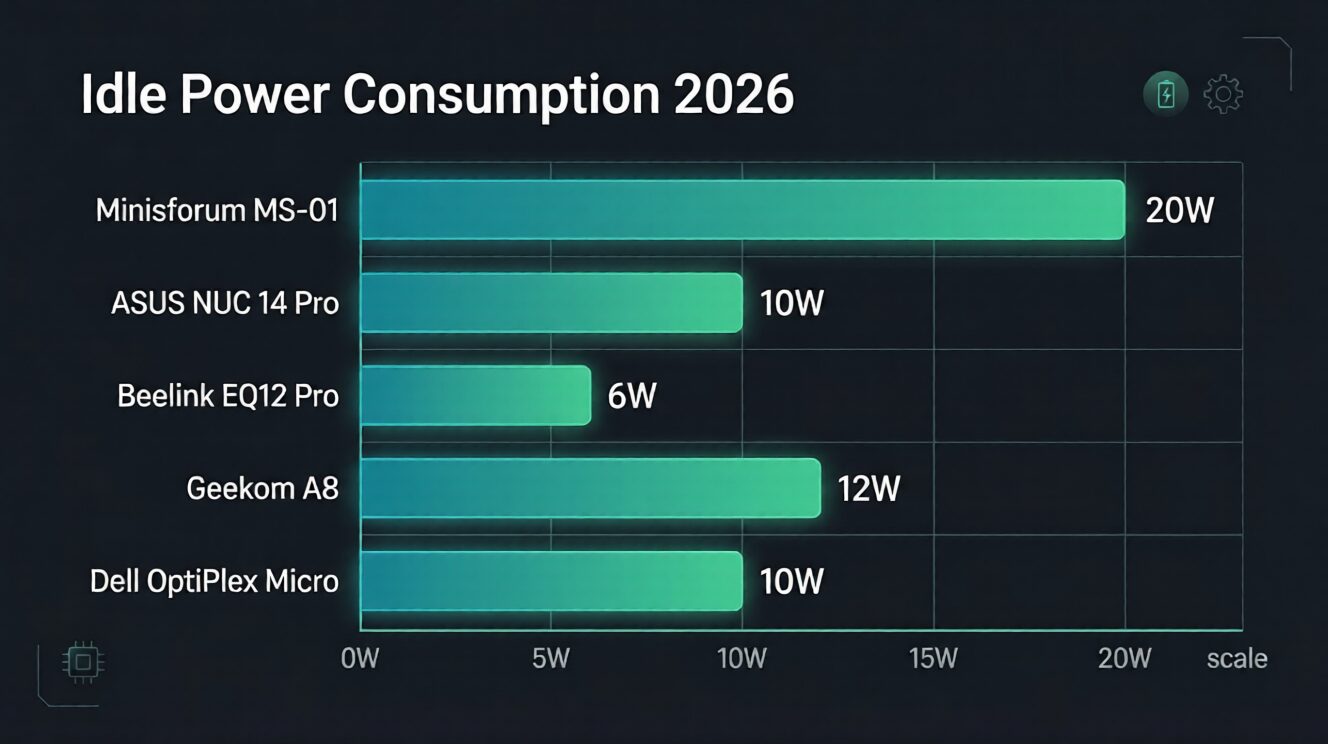
Power Efficiency Benchmarks: Idle power consumption comparison across 2026 home lab mini PCs. Lower is better for 24/7 operation.
SOURCE: EXPERT PRODUCT LAB PERFORMANCE BENCHMARKS 2026 — TECHNICAL UTILITY DIVISION
| Model | CPU Cores | Max RAM | Idle Power | 10GbE | Price (USD) |
|---|---|---|---|---|---|
| Minisforum MS-01 | 12C/16T | 64GB DDR5 | ~20W | ✅ Dual SFP+ | ~$450 |
| ASUS NUC 14 Pro | 6C/8T | 48GB DDR5 | <10W | ❌ | ~$400 |
| Beelink EQ12 Pro | 4C/4T | 16GB DDR5 | ~6W | ❌ | ~$170 |
| Geekom A8 | 8C/16T | 64GB DDR5 | ~12W | ❌ | ~$750 |
| Dell OptiPlex Micro | 6C/12T | 64GB DDR4 | ~10W | ❌ | ~$160 |
4. Home Lab Use Cases by Hardware Tier
5. Full Comparison Matrix
| Criteria | MS-01 | NUC 14 Pro | EQ12 Pro | Geekom A8 | OptiPlex Micro |
|---|---|---|---|---|---|
| Raw Performance | 🏆 Excellent | Good | Basic | 🏆 Excellent | Good |
| Power Efficiency | Good | 🏆 Best | 🏆 Best | Good | Good |
| Network (10GbE) | 🏆 Dual SFP+ | ❌ | ❌ | ❌ | ❌ |
| Value for Money | Good | Good | 🏆 Best | Average | 🏆 Best |
| Proxmox/ESXi | ✅ Ideal | ✅ Good | ⚠️ Basic | ✅ Good | ✅ Good |
| Kubernetes | ✅ Ideal | ✅ Good | ⚠️ K3s only | ✅ Good | ✅ Good |
| Noise Level | Quiet | 🏆 Silent | 🏆 Silent | Quiet | Quiet |
| Expandability | 🏆 High | Medium | Low | 🏆 High | Medium |
| Best For | Networking labs | Always-on services | Beginners | AI/ML workloads | Budget labs |
6. CTO Verdict — Which Mini PC to Choose
7. Frequently Asked Questions
For most enterprise cloud practice workloads, yes. Mini PCs run x86 architecture, eliminating ARM compatibility issues with Docker images and enterprise tools like VMware ESXi. The Raspberry Pi 5 excels at lightweight always-on tasks (Pi-hole, WireGuard), but a mini PC like the Beelink EQ12 Pro at $170 delivers dramatically more capability for Proxmox, Kubernetes, and multi-container environments.
Yes. All five mini PCs in this audit run Proxmox VE natively. The Minisforum MS-01 and ASUS NUC 14 Pro are particularly well-suited for multi-VM Proxmox deployments due to their higher RAM ceilings and VT-x/VT-d support. The Beelink EQ12 Pro handles basic Proxmox with 2–3 lightweight VMs at its stock 16GB RAM configuration.
The Minisforum MS-01 is the top choice for Kubernetes labs, primarily due to its dual 10GbE networking — critical for practicing real-world cluster networking, ingress controllers, and service mesh configurations. For budget-constrained setups, a cluster of three Beelink EQ12 Pro units (~$510 total) running K3s provides an excellent multi-node practice environment.
At US average electricity rates (~$0.12/kWh), a 10W idle mini PC costs approximately $10.51/year to run continuously. Even the most power-hungry option in this audit (MS-01 at ~20W) costs under $21/year — a negligible operational overhead compared to the career ROI of hands-on enterprise infrastructure practice. For a full enterprise ROI framework, see our CTO guide.
Intel discontinued the NUC product line in 2023, but ASUS acquired the NUC brand and continues development under the ASUS NUC name. The ASUS NUC 14 Pro is the direct successor and is available on Amazon. Alternatives from Beelink, Minisforum, and GMKtec now dominate the market with competitive or superior specifications.
Pingback: The 2026 Founder Stack: Hosting, Home Office, and AI Workflows